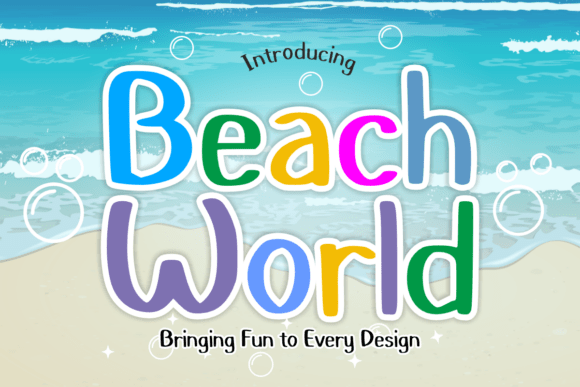
Beach World – How to Use the Tropical Script Font Without Making Common Design Mistakes
If you've ever wanted to bring the laid-back energy of a beach vacation into your designs, Beach World might be the font you've been looking for. This casual, hand-brushed script captures the essence of sun-drenched shores and salty breezes, making it ideal for everything from resort branding to summer merchandise. But like any creative tool, using it effectively requires more than just downloading and applying it to your project.
Many designers—both new and experienced—overlook key details when working with Beach World, which can lead to underwhelming results. Whether you're creating a logo, social media graphic, or product label, understanding how to use this font properly can make a big difference in clarity, professionalism, and overall impact.
What Makes Beach World Unique?
Beach World stands out because of its fluid, organic strokes that mimic handwriting in the sand. Unlike rigid, structured fonts, it offers a natural, relaxed look that feels spontaneous and authentic. This makes it especially effective for brands or projects that want to evoke a sense of leisure, adventure, or tropical escape.
It's commonly used in:
- Beach resort branding
- Travel blogs and vlogs
- Sunscreen, apparel, and accessory packaging
- Wedding invitations with a coastal theme
- Social media content for seasonal promotions
Common Mistakes When Using Beach World
Despite its charm, Beach World isn't a one-size-fits-all solution. Here are some frequent missteps that can hurt your design rather than enhance it:
1. Overusing the Font in Complex Layouts
Because of its flowing, hand-drawn style, Beach World works best in short bursts—like headlines or accent text. Using it for long paragraphs or intricate layouts can make the design hard to read and visually overwhelming.
Better approach: Use Beach World for titles, captions, or callouts, and pair it with a clean sans-serif or serif font for body text. For example, if you're designing a travel brochure, let Beach World set the tone in the headline, and use a simpler font for the descriptive content underneath.
2. Ignoring Licensing Terms
One of the most overlooked aspects of using any font—including Beach World—is understanding the licensing agreement. Some versions may be free for personal use but require a paid license for commercial projects. Failing to comply can lead to legal issues or unexpected costs later on.
Better approach: Always check the license before downloading or using the font in a client project or product. If you're unsure, reach out to the font creator or distributor for clarification.
3. Assuming It Works for All Themes
While Beach World is perfect for summer and coastal themes, it may not be appropriate for more formal or serious contexts. Using it in a corporate presentation or legal document, for example, can undermine the professionalism of your content.
Better approach: Match the font to the tone of your message. If your design needs a more polished or neutral appearance, consider a different font and use Beach World selectively as an accent.
4. Skipping the Test in Different Sizes
Handwritten scripts like Beach World can lose clarity when scaled down. Some letters may blend together or become difficult to read, especially in small print or digital thumbnails.
Better approach: Preview the font at various sizes before finalizing your design. If you're using it for a logo or app icon, test it in multiple formats to ensure it remains legible and retains its charm.
What to Check Before Downloading or Buying Beach World
Before you commit to using Beach World, take a few minutes to verify the following:
- Font Format: Is it available in OpenType (.otf), TrueType (.ttf), or another format compatible with your software?
- Character Set: Does it include uppercase, lowercase, numbers, and special characters you need?
- Ligatures & Alternates: Does the font offer stylistic variations or ligatures to enhance design flexibility?
- Support & Updates: Is the font actively maintained by the creator? Will you receive updates or support if issues arise?
How to Pair Beach World With Other Fonts
Pairing Beach World with complementary fonts can elevate your design while maintaining readability. A good rule of thumb is to combine it with a more structured typeface that balances its organic flow.
For example:
- Headline: Beach World – for a fun, tropical title
- Body Text: Montserrat or Lato – clean and modern sans-serif fonts that provide contrast and clarity
This contrast helps guide the viewer’s eye and keeps your message clear and engaging.
Practical Design Tips for Using Beach World
To get the most out of Beach World, consider these helpful tips:
- Limit the amount of text: Use it for short, impactful phrases rather than long paragraphs.
- Adjust spacing: Kerning and letter spacing can dramatically affect legibility. Don’t hesitate to fine-tune these settings.
- Use it in themed projects: Think beach weddings, summer festivals, or coastal branding where the vibe aligns with the font’s personality.
- Test across platforms: Make sure the font renders well on both print and digital formats, including mobile devices.
Final Thoughts
Beach World is more than just a font—it's a design tool that brings warmth, personality, and a sense of adventure to your creative work. But like any artistic choice, it requires thoughtful application. By avoiding common mistakes and understanding how to use it effectively, you can ensure your designs feel both authentic and professional.
Whether you're a small business owner designing your own product labels or a freelance designer crafting a client’s summer campaign, taking the time to evaluate and properly implement Beach World can help your work stand out in a crowded visual landscape.